

Kobo Vox Tablet Review - Specs n Features
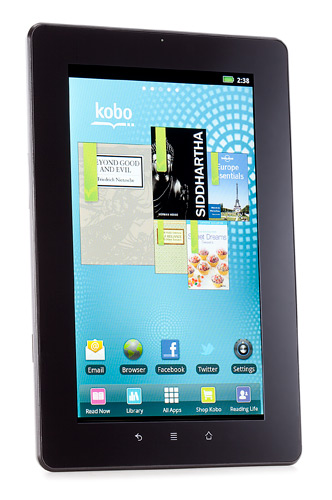
Kobo Vox Tablet Features
The Kobo Vox, Nook Tablet, and Kindle Fire all share the same underlying Google Android 2.3 software. Where Barnes and Noble and Amazon heavily modified their user interfaces, the Kobo sticks relatively close to stock Android. The lock screen is changed, and mimics the side-swiping unlock motion on both the Kindle Fire and Nook Tablet. The five home screens are populated with pre-loaded apps like The Merriam-Webster Dictionary, Press Reader and Zinio for newspaper and magazine reading, which are useful enough, but are also easy to remove. Unlike the Nook Tablet or Kindle Fire, Kobo stuck with home-screen widgets, including an appealing collage of links to recently read books. The Kobo Vox lacks front and rear cameras. The Vox connects to the Internet using 802.11 b/g/n Wi-Fi, and I had no trouble connecting to our Lab networks. There's no cellular radio or Bluetooth connectivity. The 7-inch fringe field switching (FFS+) LCD screen is bright and the 1,024-by-600-pixel resolution makes text look clear and crisp. Kobo went with an FFS+ display over in-plane switching (IPS), claiming the former performs better in bright-light settings.


Kobo Vox Tablet Specification
- Flash support Yes
- GPS Yes
- Music Playback Formats AAC, FLAC, MP3, OGG, WAV
- Photo Formats BMP, JPEG, PNG, GIF
- Video Formats MPEG4, QuickTime, XVid
- Processor Speed 800 MHz
- Screen Resolution 1024 x 600 pixels
- Operating System Google Android 2.3 or earlier
- Camera(s) None
- CPU Freescale i.MX51
- Video Chat No
- Screen Size 7 inches, 7 inches
- Storage Capacity (as Tested) 8 GB, 8 GB
- Dimensions 7.6 x 5 x 0.5 inches, 7.6 x 5 x 0.5 inches
- Weight 14.2 oz, 14.2 oz
- Battery Type Supported Rechargeable
- Networking Options 802.11b, 802.11g, 802.11n
- Email Access Dedicated email app
- Web Browser Yes