Home Computer & Gadgets | Automobiles | Sports | Audio Visual Entertainment | Fashion & Jewelry | Love n Dating
  Technology Art, Design & Paintings | Funny/Strange Pictures | Celebrities Xposed | Humor, Jokes, Riddles | Astrology
  Mobile Health & Fitness | Recipe Corner | Travel Tourism | Mobile Phone Reviews | Sms Collection | The Music Mania
Friendship SMS Photo Shoots, Magazines, FHM, Maxim, Vogue, Filmfare, Famina MagXone  Latest Topics   Chat   RegisterRegister   Log inLog in 

Things to set a Network when Computers are in different room

Post new topic   Reply to topic    Home -> Science & Technology Zone -> Windows ( Vista, XP ), Linux, Mac Tips, Tricks & Hacks
Goto Previous Topic   Goto Next Topic  
Author Message Share and Tell Friends
ar
Ultimate Contributor


Joined: 17 Feb 2007
Posts: 6708
Gender: Male
Location: Pakistan, Lahore
PostPosted: Jan 24, 2009   Topic Views : 623   Post subject: Things to set a Network when Computers are in different room Reply with quote

To help determine which network technology best suits your needs answer these questions:

  • How many computers do you have?
  • Where are they located—are they in the same room or different rooms?
  • Are any of your computers laptops?
  • Do any of your computers have network adapters installed? If so, what are their types (Ethernet, HPNA, or wireless)?


Applyyour answers to the following examples of home network layouts andconfigurations. These suggest how to use the different hardware choicesavailable and can guide you in deciding which hardware you need to buy.
Computers are in the different room


Things to set a Network when Computers are in different room

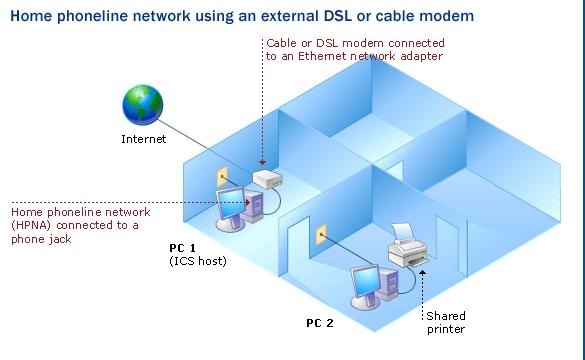
In this networkexample, you've recently purchased your new Windows XP computer and setit up in your home office. You have moved your older computer into yourchild's room. The new computer—which is the ICS host—has an Ethernetnetwork adapter attached to an external DSL or cable modem.

If there are phone jacks located near each computer, purchase:

  • One external USB HPNA network adapter for each computer.

Homephoneline network adapter (HPNA) kits are available that make it easyto network one or two computers together. You simply plug the networkadapter into the USB port on the computer and into the phone jack. Thecomputers are then networked together.

As in the previoussetup example, another solution is to purchase wireless networkadapters for both computers. Simply plug an adapter into the USB porton each, and the two computers can communicate using radio signals.
| More Share
Back to top  
editorawais
Ultimate Contributor


Joined: 15 Nov 2008
Posts: 3687
Gender: Male
Location: Buzy!!!
PostPosted: Jan 24, 2009     Post subject: Reply with quote

Nice sharing
Back to top  
Display posts from previous:   
Post new topic   Reply to topic    Home -> Science & Technology Zone -> Windows ( Vista, XP ), Linux, Mac Tips, Tricks & Hacks All times are GMT
Page 1 of 1
Quick Reply
Message body:

Add smilies


Jump to:  
Here You can
Download files

Top 5 Most Viewed Topics : Last 120 Days
Shutdown Windows XP faster
~~~Google Update~~~
The General Shortcuts
Microsoft Windows 7: USB Installer For Netbook Users
window vista desktop wallpaper
5 Latest Topics in this Forum
window vista desktop wallpaper
Microsoft Windows 7: USB Installer For Netbook Users
Motherboard
~~~Google Update~~~
Top 5 Softwares to remove virus, spyware,disinfecting Trojan

Top Favourite Posts

Tabu - Hi Living Magazine Scans

Lara is beautiful

Emma Watson: Daily Mail Shots