|
|
|
| Author |
Message
|
itslucky Fun Addict


Joined: 14 Jan 2009 Posts: 912
Gender: 
Location: Heart of my Carbon Copy
|
Posted: Apr 24, 2009 Topic Views : 990 Post subject: How to Start Java Programming |
|
|
My Dear, for java development, u didn't need any of the large compiler or the programs
* Java is just three steps
1. write a java program ( u can also write ur code in Notepad)
2. compile it
3. Run on any Machine
for the developers:
u need the Java JDK (Java Development Kit) u can download it from
http://java.sun.com/products/archive/j2se/6u6/index.html
u can also write ur code in Notepad, but the IDEs alsways the best choice because they are very usefull ( to correct ur typing/syntax error )
so here is the link of one of the IDE (Netbeans)
http://www.netbeans.org/downloads/
*The IDE is not so important to be with you (but it is Best to be with you)*
Now u have all the tools, lets Dirty ur hands with the Java Coding
|
|
| Back to top |
|
 |
|
|
itslucky Fun Addict


Joined: 14 Jan 2009 Posts: 912
Gender: 
Location: Heart of my Carbon Copy
|
Posted: Apr 24, 2009 Post subject: Write ur FIRST JAVA PROGRAM |
|
|
According to me (Lucky), in any of the programming language we must know about following three things
1. How to print info on Screen?
2. How to take input?
3. How to print the taken inputs?
so now lets start with the Step 1: (Print Info on Screen)
1. open the notepad
2. type/copy the following code
////////////////////////////////////
public class myprogram {
public static void main(String args[])
{
System.out.println("Hi...!!! Welcome to my First Program in Java...");
}
}
///////////////////////////////////
3. now save the code to the
>>> C:\Program Files\Java\jdk1.6.0_06\bin
(The place where your JDK is installed {above is the dafault location} )
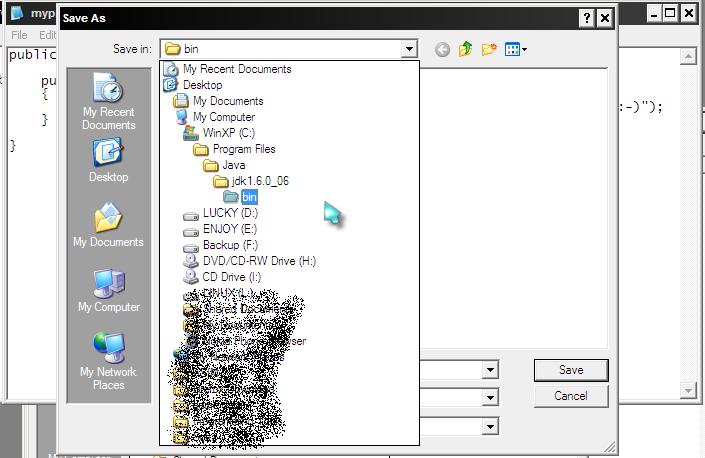
NOTE:
in the above pic when i type the name of program, it is the same name as the name of my class in the code..
and i have type "" double quotes and in them i type "myprogram.java"
now save it.
4. Now lets Compile and run the code
Open Run from Start Menu (or Shortcut key "win+R")
and type
CMD
hit enter, and goto the following location
C:\Program Files\Java\jdk1.6.0_06\bin
by typing as the following picture
then compile and run the code
In the above pic
To compile the code:
we type
>> javac myprogram.java (hit Enter)
then execute the compiles program
>> java myprogram (hit enter)
////////////////////////////////
from the above, I think u people now print any text on the screen
just edit the
>>System.out.println("Hi...!!! Welcome to my First Program in Java...");
line and thats it...
|
|
| Back to top |
|
 |
chandoo Ultimate Contributor


Joined: 08 Sep 2007 Posts: 4168
Gender: 
Location: Lahore
|
Posted: Apr 24, 2009 Post subject: |
|
|
so you got a new forum. congrats
good start. all the best.
|
|
| Back to top |
|
 |
itslucky Fun Addict


Joined: 14 Jan 2009 Posts: 912
Gender: 
Location: Heart of my Carbon Copy
|
Posted: Apr 24, 2009 Post subject: |
|
|
Thanx!!!
|
|
| Back to top |
|
 |
sunny Initiator


Joined: 28 Aug 2008 Posts: 1335
Gender: 
|
Posted: Apr 24, 2009 Post subject: |
|
|
|
Great work..! It will help the needy in this field.... Keep going..!!!
|
|
| Back to top |
|
 |
ar Ultimate Contributor


Joined: 17 Feb 2007 Posts: 6708
Gender: 
Location: Pakistan, Lahore
|
Posted: Apr 25, 2009 Post subject: |
|
|
|
Thanks for Sharing
|
|
| Back to top |
|
 |
editorawais Ultimate Contributor


Joined: 15 Nov 2008 Posts: 3687
Gender: 
Location: Buzy!!!
|
Posted: Apr 25, 2009 Post subject: |
|
|
|
gr8 work dude.thnx for sharing
|
|
| Back to top |
|
 |
itslucky Fun Addict


Joined: 14 Jan 2009 Posts: 912
Gender: 
Location: Heart of my Carbon Copy
|
Posted: Apr 25, 2009 Post subject: |
|
|
Thanku Thanku
|
|
| Back to top |
|
 |
ujala Ultimate Contributor


Joined: 31 Jan 2009 Posts: 7425
Gender: 
|
Posted: Apr 26, 2009 Post subject: |
|
|
now can i call u
SIR LUCK
Thanks 4 great sharing
|
|
| Back to top |
|
 |
itslucky Fun Addict


Joined: 14 Jan 2009 Posts: 912
Gender: 
Location: Heart of my Carbon Copy
|
Posted: Apr 26, 2009 Post subject: |
|
|
But still when i look at ur POSTS, it seems that u r elder then me,
so just call me "Lucky" becoz "itsLucky"
its my pleasure that u call me that...
u welcome...
and if u have any query then please post it...
i'll be glad to assist u..!!!
|
|
| Back to top |
|
 |
|
|
|
|
|
|
|
Here You can Download files
|
|